
Create a Talking Detective Avatar for a Noir Crime Story

The city never sleeps, and neither does your detective. Noir lives on mood: a flickering streetlamp, a cigarette that never gets lit, and a narrator who sounds like he’s seen too much. You can capture all of that with a talking photo of a trench-coated investigator and a few moody lines of script. Pippit handles the animation, so your energy goes into the story. If you’ve ever wanted to open a case file and let a character read it aloud, this guide walks you through it. Dim the lights, pick your portrait, and open Pippit when you’re ready to start the investigation.
Rain, smoke, and a voice like gravel
Noir works because it trusts atmosphere over action. Viewers don’t need a car chase. They need a detective staring out a rain-streaked window while he explains how everything went wrong. That makes the genre a great fit for a speaking avatar, since so much of it leans on narration. The voice carries the world: it tells us the city is corrupt, the client is lying, and the coffee is terrible. Even a single still portrait can sell the mood if the lighting is right, with hard shadows across half the face and a hat tilted just enough to hide the eyes. Keep the palette limited, mostly black and gray with one warm accent like amber.
Casting your case
Every detective needs people to distrust. Sketch a small cast before you write a word:
- The detective: tired, sharp, and fond of understatement.
- The client: elegant, nervous, and holding something back.
- The informant: a bartender who knows everyone’s secrets and shares none for free.
- The rival: a smooth officer who always arrives one minute too late.
- The victim: never seen, but mentioned in every other sentence.
You only need the detective on screen. The rest can live inside his narration.
Opening the file in three steps
Your detective is ready for his close-up. Here’s how Pippit turns a still portrait into a narrator.
Step 1: Hand over the mugshot
Sign into Pippit and select Video generator.
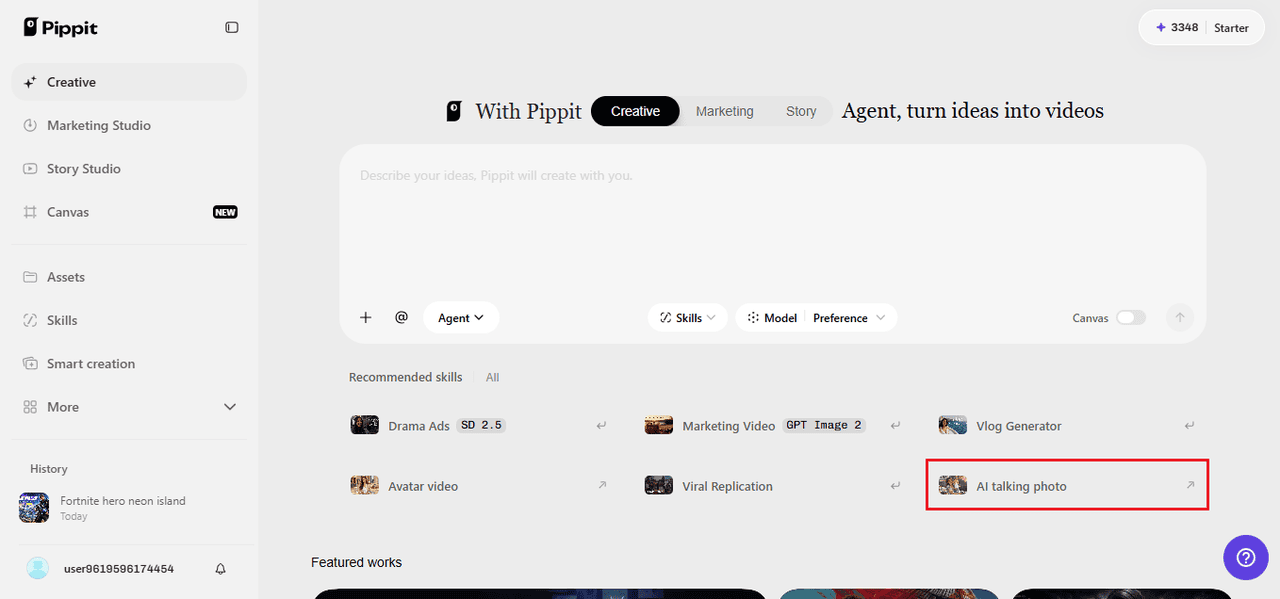
Select the AI option that turns your static image into a talking video, after which select your detective’s portrait by either clicking on the upload button or dragging and dropping the file. The file should be at least 256 x 256 pixels in size.
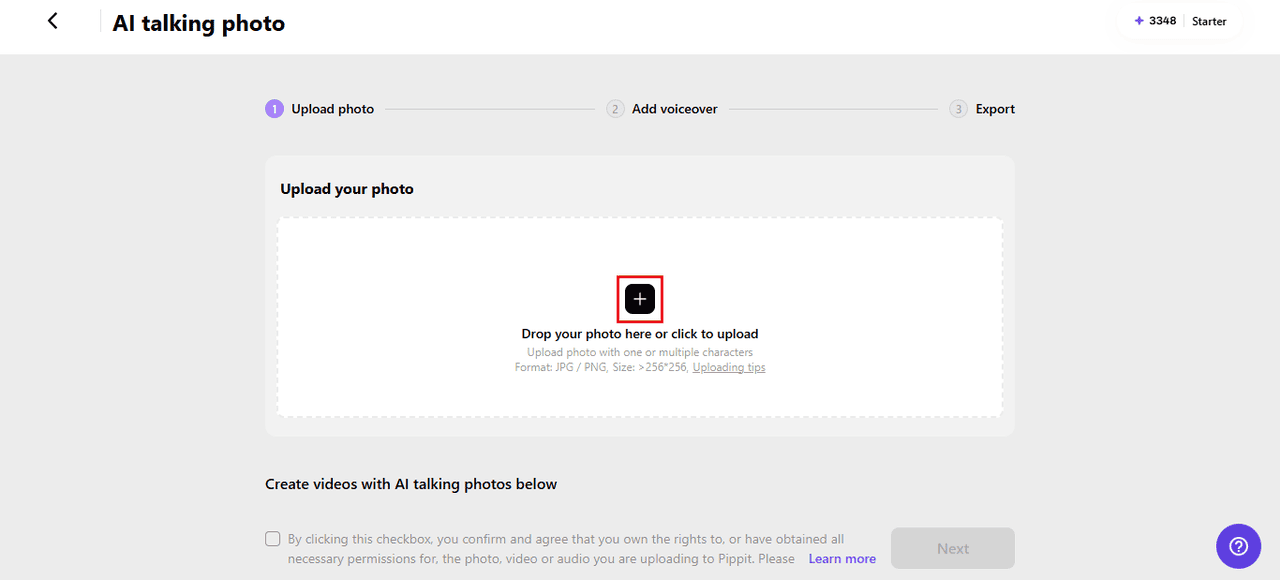
Step 2: Dictate the case notes
Select Read out script and type your narration. Choose a language, then audition voices until you find something low and weary. Add captions in a style that suits the mood and hit Save. If you’d rather deliver the lines yourself, the Upload audio clip tab accepts your own recording or a trending clip.
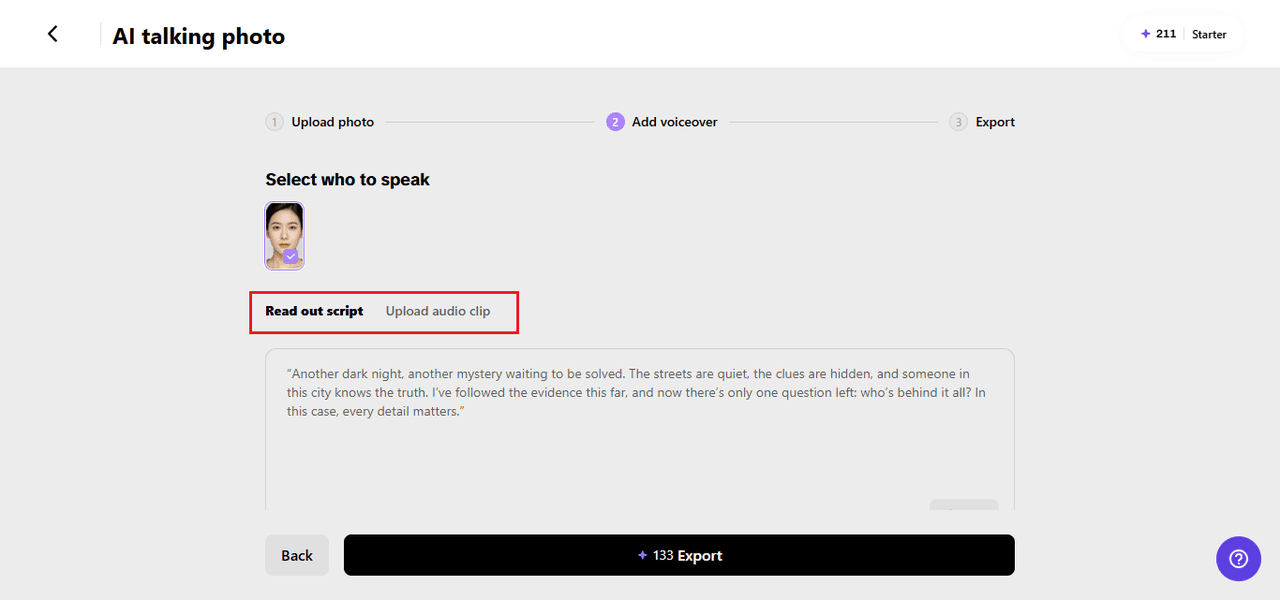
Step 3: File the report
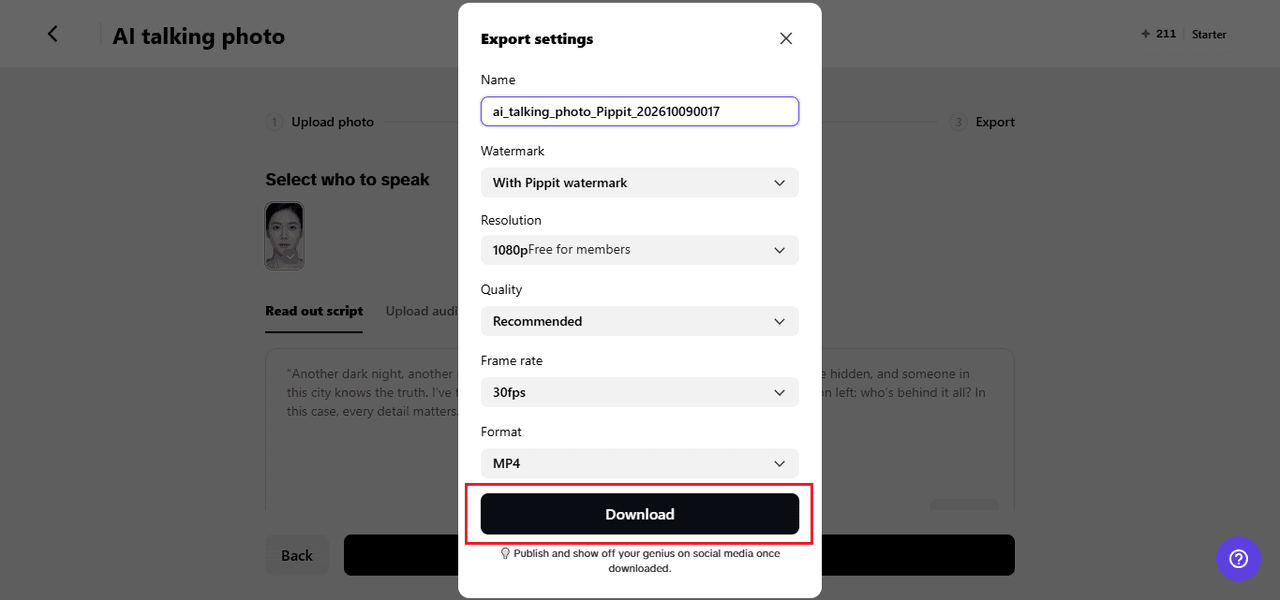
Click Export and rename the video. Decide whether to keep the watermark, then set the resolution, quality, frame rate, and format. Press Download and the finished clip is saved to your device.
Writing narration that sounds like smoke
Noir narration has a distinct sound: short sentences, sharp similes, and a bit of cynicism. Instead of saying a woman was beautiful, say she walked in like trouble with good posture. Open with a hook, like “It was one of those nights where the rain didn’t wash anything clean.” Then drop details slowly. Never explain the whole mystery at once. Give the viewer a clue, then a doubt, then a new question. Read each line aloud. If it sounds like a greeting card, rewrite it. The best noir lines sound slightly tired, which is exactly what you want from this kind of voice.
Scoring the scene
A rainy alley needs more than a voice, and SeedAudio 1.5 can build that world around your detective.
Atmosphere from a sentence
Describe a scene, such as a wet street, a distant siren, and a slow saxophone, and you receive dialogue, ambience, effects, and music together as one piece.
A voice that stays the same
Supply a reference recording and the detective’s tone and accent hold steady from episode to episode, which matters when you’re building a series.
Cues placed on the beat
Timestamps let you place a phone ring or a sudden sting at the exact second the plot twist lands.
Tracks you can balance
Dialogue, ambience, effects, and music arrive separately, so you can lower the rain when the confession needs to be heard.
One case, many chapters
A single clip gives you a mood, but chapters give you a story. Break your case into short installments: the client walks in, the first clue turns up, the informant lies, the twist arrives, and the culprit is named. Keep each clip around forty seconds and end on a line that makes viewers curious. Posting on a regular schedule helps, since people like knowing when the next chapter drops. You can also reuse the same portrait for every episode, which keeps the series consistent and cuts your workload. A recurring catchphrase, like “Another night, another lie,” becomes the signature your audience waits for.
Last checks before you close the case
Before you publish, watch the clip with the sound off and make sure the face still looks right and the captions are easy to read against the dark background. Then listen with your eyes closed to check the pacing. If a sentence feels rushed, add a comma or split it in two. Keep the brightness high enough that the face doesn’t disappear on a phone screen. Trim any silent gap at the start, since viewers decide quickly whether to stay. Finally, save your script in a notes file so the next episode keeps the same details, because a detective who forgets his own case looks sloppy.
The case is yours to crack
Every great noir begins with a lonely voice and a bad feeling. With Pippit, you can give that voice a face and send it into the night in just a few clicks. Write the opening line, pick the right tone, and let your detective take it from there. Open Pippit today and start your first case.
-
-
Stephanie Vaquer Ass Photos
Stephanie Vaquer is a badass with a great ass. Check out these hot photos of the WWE Superstar's sexy booty on display. Stephanie Vaquer is a Chilean professional wrestler under...
Hot Stephanie Vaquer Photos
See these hot photos of Stephanie Vaquer, a Chilean professional wrestler under contract to WWE who performs on the Raw brand. She is a former Women's World Champion, having held...
Sol Ruca Ass Photos
Sol Ruca is a badass with a great ass. Check out these hot photos of the WWE Superstar's sexy booty on display. Sol Ruca is an American professional wrestler, below-average surfer,...
-

Create a Talking Detective Avatar for a Noir Crime Story
The city never sleeps, and neither does your detective. Noir lives on mood: a flickering streetlamp, a cigarette that never gets lit, and a narrator who sounds like he’s seen...

How Professional Wrestling Has Evolved: From Regional Promotions to a Global Entertainment Industry
Professional wrestling didn’t start out as a billion-dollar spectacle beamed into living rooms across six continents. It started small. Territorial, even. And the journey from smoky armories to sold-out stadiums...

Everyday Signs That Your Hormones May Be Changing
Hormones can have a surprising influence on everyday life. They are involved in many of the body’s essential processes, including the menstrual cycle, sleep, energy, mood, appetite, and reproductive health....


0 comments